Spring 教程
- Spring 教程
- Spring 模块
- Spring 示例
- spring 创建应用
- Spring IoC容器
- Spring 依赖注入
- Spring 自动装配
- Spring Dependency注入
- Spring AOP
- Spring JdbcTemplate
- Spring ORM框架
- Spring SPEL表达式
- Spring MVC
- Spring MVC表单
- Spring MVC CRUD
- Spring MVC验证
- Spring MVC Tiles
- Spring Remoting
- Spring JAXB
- Spring Java Mail
- Spring Struts集成
- Spring security
- Spring Angular CRUD
Spring Security自定义登录
Spring Security提供了它自己的内置登录模块来对用户进行身份验证。它验证用户凭据并提供对应用程序的访问权限。
该模块呈现的登录页面是内置的。因此,我们不需要创建新的jsp页面。但是,如果我们要自定义登录页面,那我们该怎么做呢?
答案是,我们可以创建自己的jsp登录页面并将其集成到应用程序中。在本主题中,我们将创建一个自定义登录页面并将使用它来登录。
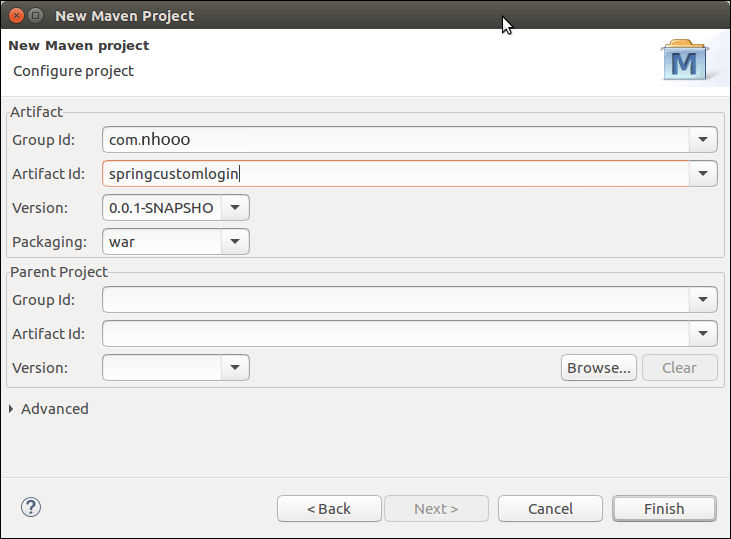
请参见示例。通过提供以下详细信息来创建maven项目。
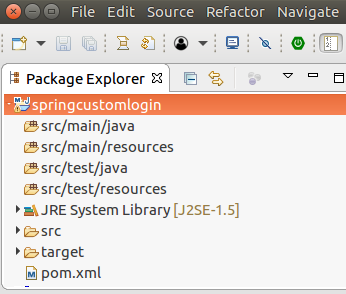
完成后,它将创建以下项目结构。
安全性配置
配置项目以应用Spring security性。它需要以下四个文件。创建一个包 com.nhooo 并将这些文件放入其中。
//AppConfig.java
package com.nhooo;
import org.springframework.context.annotation.Bean;
import org.springframework.context.annotation.ComponentScan;
import org.springframework.context.annotation.Configuration;
import org.springframework.web.servlet.config.annotation.EnableWebMvc;
import org.springframework.web.servlet.view.InternalResourceViewResolver;
import org.springframework.web.servlet.view.JstlView;
@EnableWebMvc
@Configuration
@ComponentScan({ "com.nhooo.controller.*" })
public class AppConfig {
    @Bean
    public InternalResourceViewResolver viewResolver() {
        InternalResourceViewResolver viewResolver
                          = new InternalResourceViewResolver();
        viewResolver.setViewClass(JstlView.class);
        viewResolver.setPrefix("/WEB-INF/views/");
        viewResolver.setSuffix(".jsp");
        return viewResolver;
    }
}
//MvcWebApplicationInitializer.java
package com.nhooo;

import org.springframework.web.servlet.support.AbstractAnnotationConfigDispatcherServletInitializer;
public class MvcWebApplicationInitializer extends
        AbstractAnnotationConfigDispatcherServletInitializer {
    @Override
    protected Class<?>[] getRootConfigClasses() {
        return new Class[] { WebSecurityConfig.class };
    }
    @Override
    protected Class<?>[] getServletConfigClasses() {
        // TOdo Auto-generated method stub
        return null;
    }
    @Override
    protected String[] getServletMappings() {
        return new String[] { "/" };
    }
}
//SecurityWebApplicationInitializer.java
  package com.nhooo;
    import org.springframework.security.web.context.*;

    public class SecurityWebApplicationInitializer
        extends AbstractSecurityWebApplicationInitializer {

    }
//WebSecurityConfig.java
package com.nhooo;
import org.springframework.context.annotation.*;
//import org.springframework.security.config.annotation.authentication.builders.*;
import org.springframework.security.config.annotation.web.builders.HttpSecurity;
import org.springframework.security.config.annotation.web.configuration.*;
import org.springframework.security.core.userdetails.*;
//import org.springframework.security.core.userdetails.UserDetailsService;
import org.springframework.security.provisioning.InMemoryUserDetailsManager;
import org.springframework.security.web.util.matcher.AntPathRequestMatcher;
import org.springframework.web.servlet.config.annotation.WebMvcConfigurer;
@EnableWebSecurity
@ComponentScan("com.nhooo")
public class WebSecurityConfig extends WebSecurityConfigurerAdapter {

@Bean
public UserDetailsService userDetailsService() {
    InMemoryUserDetailsManager manager = new InMemoryUserDetailsManager();
    manager.createUser(User.withDefaultPasswordEncoder()
    .username("irfan").password("khan123").roles("ADMIN").build());
    return manager;
}

@Override
protected void configure(HttpSecurity http) throws Exception {

      http.authorizeRequests().
      antMatchers("/index", "/user","/").permitAll()
      .antMatchers("/admin").authenticated()
      .and()
      .formLogin()
      .loginPage("/login")
      .and()
      .logout()
      .logoutRequestMatcher(new AntPathRequestMatcher("/logout"));
}
}
请参阅,在configure方法中,在formLogin()之后,使用方法 loginPage("/login")。这是调用自定义登录页面所需的实际方法。
查看
首先创建我们自己的登录页面。根据Spring官员的说法,登录页面应如下所示。
//login.jsp
<%@ taglib prefix="c" uri="http://java.sun.com/jsp/jstl/core" %>
<c:url value="/login" var="loginUrl"/>
<form action="${loginUrl}" method="post">
    <c:if test="${param.error != null}">
        <p>
            Invalid username and password.
        </p>
    </c:if>
    <c:if test="${param.logout != null}">
        <p>
            You have been logged out.
        </p>
    </c:if>
    <p>
        <label for="username">Username</label>
        <input type="text" id="username" name="username"/>
    </p>
    <p>
        <label for="password">Password</label>
        <input type="password" id="password" name="password"/>
    </p>
    <input type="hidden"
        name="${_csrf.parameterName}"
        value="${_csrf.token}"/>
    <button type="submit" class="btn">Log in</button>
</form>
//index.jsp
<html>
<head>
<title>Home Page</title>
</head>
<body>
<h3> Welcome to Nhooo! <br> </h3>
<a href="admin">Login here</a>
</body>
</html>
//admin.jsp
<html>
<head>
<meta http-equiv="Content-Type" content="text/html; charset=UTF-8">
<title>Home Page</title>
</head>
<body>
Login Successful!
<a href="logout">logout</a>
</body>
</html>
控制器
在com.nhooo.controller包内创建一个控制器HomeController。
//HomeController.java
package com.nhooo.controller;
import org.springframework.stereotype.Controller;
import org.springframework.web.bind.annotation.RequestMapping;
import org.springframework.web.bind.annotation.RequestMethod;
@Controller
public class HomeController {

    @RequestMapping(value="/", method=RequestMethod.GET)
    public String index() {

        return "index";
    }
    @RequestMapping(value="/login", method=RequestMethod.GET)
    public String login() {

        return "login";
    }
    @RequestMapping(value="/admin", method=RequestMethod.GET)
    public String admin() {

        return "admin";
    }
}
项目依赖项
//pom.xml
<project xmlns="http://maven.apache.org/POM/4.0.0" xmlns:xsi="http://www.w3.org/2001/XMLSchema-instance" xsi:schemaLocation="http://maven.apache.org/POM/4.0.0 http://maven.apache.org/xsd/maven-4.0.0.xsd">
  <modelVersion>4.0.0</modelVersion>
  <groupId>com.nhooo</groupId>
  <artifactId>springcustomlogin</artifactId>
  <version>0.0.1-SNAPSHOT</version>
  <packaging>war</packaging>
  <properties>
    <maven.compiler.target>1.8</maven.compiler.target>
    <maven.compiler.source>1.8</maven.compiler.source>
</properties>
<dependencies>
  <dependency>
            <groupId>org.springframework</groupId>
            <artifactId>spring-webmvc</artifactId>
            <version>5.0.2.RELEASE</version>
        </dependency>
        <dependency>
        <groupId>org.springframework.security</groupId>
        <artifactId>spring-security-web</artifactId>
        <version>5.0.0.RELEASE</version>
    </dependency>
<dependency>
    <groupId>org.springframework.security</groupId>
    <artifactId>spring-security-core</artifactId>
    <version>5.0.4.RELEASE</version>
</dependency>
    <!-- https://mvnrepository.com/artifact/org.springframework.security/spring-security-config -->
<dependency>
    <groupId>org.springframework.security</groupId>
    <artifactId>spring-security-config</artifactId>
    <version>5.0.4.RELEASE</version>
</dependency>


        <!-- https://mvnrepository.com/artifact/javax.servlet/javax.servlet-api -->
<dependency>
    <groupId>javax.servlet</groupId>
    <artifactId>javax.servlet-api</artifactId>
    <version>3.1.0</version>
    <scope>provided</scope>
</dependency>
<dependency>
    <groupId>javax.servlet</groupId>
    <artifactId>jstl</artifactId>
    <version>1.2</version>
</dependency>
</dependencies>
  <build>
    <plugins>
        <plugin>
            <groupId>org.apache.maven.plugins</groupId>
            <artifactId>maven-war-plugin</artifactId>
            <version>2.6</version>
            <configuration>
                <failOnMissingWebXml>false</failOnMissingWebXml>
            </configuration>
        </plugin>
    </plugins>
</build>
</project>
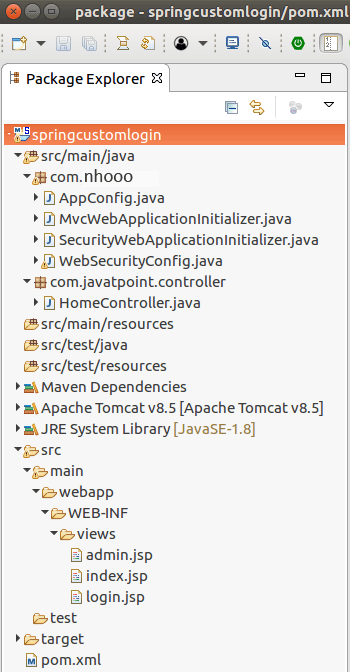
项目结构
我们的项目如下所示:
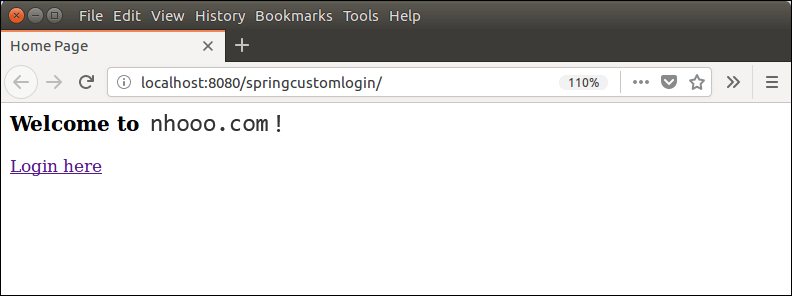
运行服务器
输出:
现在,通过提供用户凭据登录。
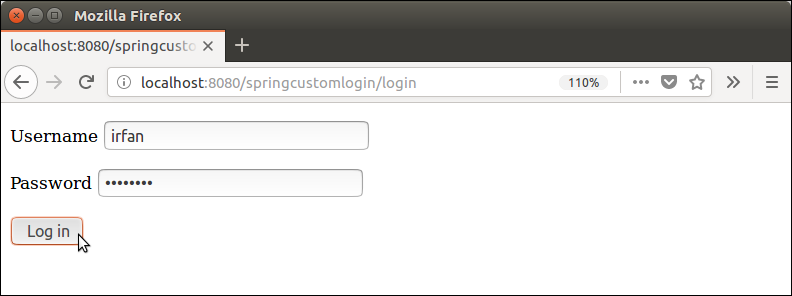
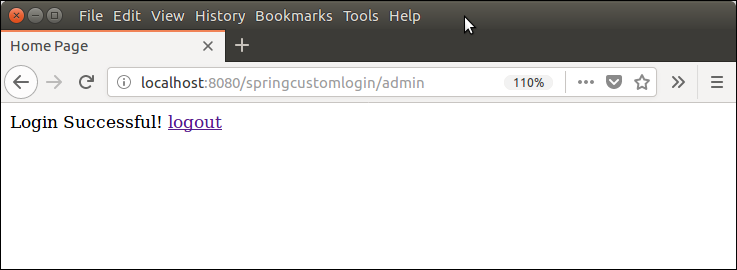
看,它工作正常。现在,我们可以根据需要创建更具装饰性和个性化的装饰。